- DATE:
- AUTHOR:
- The Cotality CMS team

October 8, 2026 production release: Updates to findings management, assignments, workflows, reconciliation, organization settings, and rule accuracy
This October 8, 2026 production release introduces enhancements across findings management, assignments, workflow, reconciliation, organization settings, and order creation. It also includes usability improvements and fixes designed to improve review accuracy and consistency.
What's new
Assignment history
Collateral Investigate now provides an assignment log that gives users greater visibility into assignment activity and changes over the life of an order.
Findings import change visibility
Findings management now provides better visibility into changes made during rule imports, making it easier to identify import-related differences.
Configurable session duration (see screenshot)
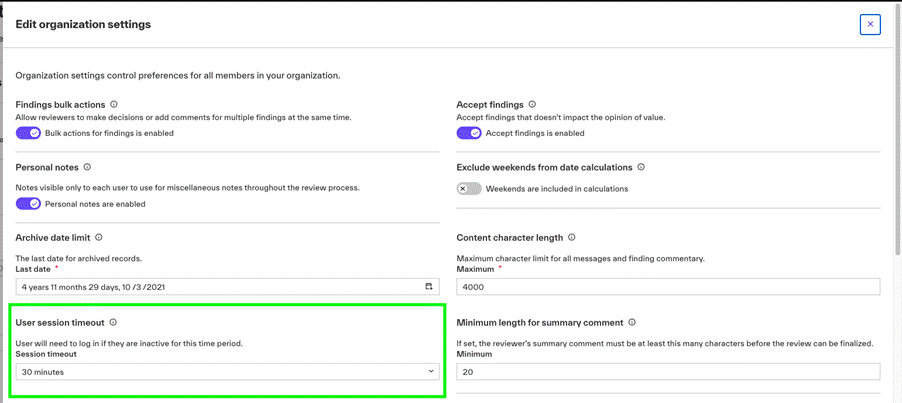
Organizations can now configure session duration and timeout settings to better align Collateral Investigate with client-specific session requirements.
Optional descriptions for “Other” order classifications
When an Other value is selected for an order classification, Collateral Investigate now supports an optional description, providing additional context when the available classifications do not fully describe the order.
Reviewer escalation workflow support
Workflow capabilities have expanded to support reviewer escalation scenarios, allowing the platform to better manage orders that require escalation during review.
Review artifacts generation status controls (see screenshots)
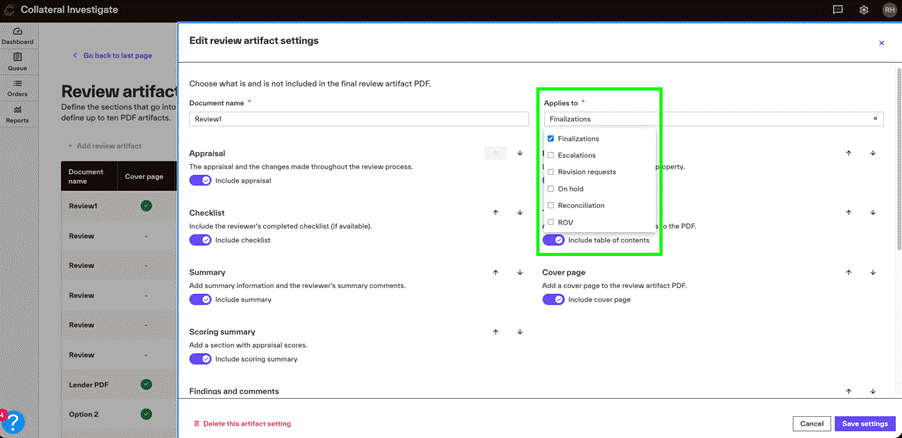
Added the ability to choose which status(es) an artifact should be generated automatically through a multi-select dropdown in the Review artifact settings.
What's changed or improved
Admin role protection
Organization users can no longer edit the Admin role, helping protect administrative role configuration.
Reconciliation appraisal numbering
Reconciliation screens and PDF output now use consistent, static timestamp-based appraisal numbering to make appraisal references easier to identify across reconciliation views.
Reconciliation PDF identifiers
Added additional identifiers to the Reconciliation section of the PDF artifact to improve clarity when reviewing reconciliation information.
Required checklist indicators
Checklist sections and items that are required are now more clearly identified when labels are unavailable.
Finalization guidance
The Finalize button tooltip has been updated to better align its guidance with the current status of findings and checklist requirements.
Review findings options
Removed the Flag as reconciliation option from the More options menu in Review Findings.
Workflow assignment and escalation
Updated assignment and reviewer-escalation workflow handling to better account for tier settings.
Rule quality improvements (see grid at the bottom)
Continued rule analysis and optimization efforts focused on subject data, site information, comparable selection, unit counts, gross living area, amenities, rental information, and reconciliation-related rule coverage.
Ongoing improvements help ensure rules fire consistently and provide accurate review results.
Platform maintenance
We migrated backend application components as part of ongoing platform maintenance and modernization. This change does not introduce a new customer workflow.
What's fixed
When a reviewer opens an order returned to them through the Review Findings workflow, the order now moves to In Review status.
Resolved user interface issues affecting the display and management of larger teams.
Corrected tier filtering behavior in All Findings and individual tier views so findings are displayed according to the selected tier.
Addressed false-positive behavior associated with rule H1-UAD1425-A to improve the accuracy of applicable findings.
The Write Message window now consistently enforces the maximum permitted message length.
The Add a Finding window now consistently enforces maximum input lengths for applicable user-entered fields.
Support
If you encounter any issues or have feedback during UAT testing, please submit a ticket here.
New feature screenshots
You can now configure your session timeouts for Collateral Investigate. Go to Organization Settings and the new User session timeout section. This dropdown lets you choose 15-minute intervals from 15 minutes up to 1 hour. When you save, this will apply to all your users.
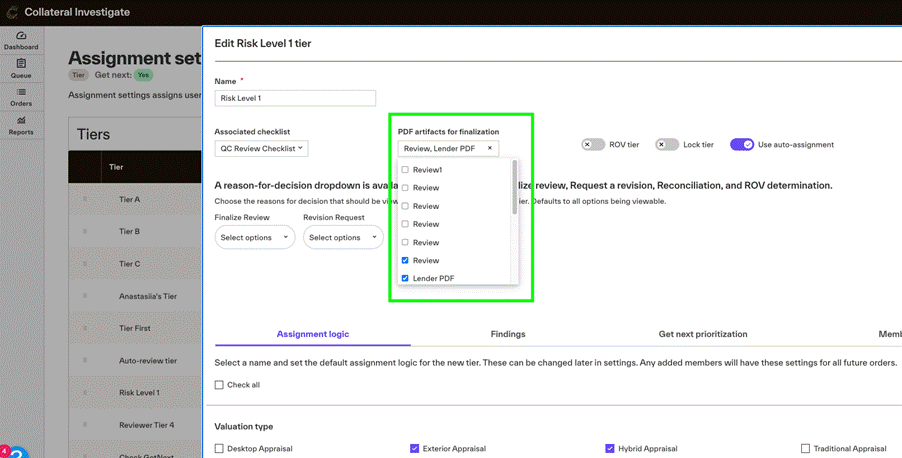
You can now choose which status(es) an artifact should be generated automatically through a multi-select dropdown in the Review artifact settings. Go to Review Artifact in the settings dropdown. Then edit or create a new review artifact. In the top-right corner, you’ll see a new multi-select dropdown labeled Applies to. Be sure that all artifacts for any statuses you want to automatically generate an artifact are selected in Assignment settings, Edit tier, in the multi-select dropdown labeled PDF artifacts for finalization.
Rule updates
The rules below have been updated in Collateral Investigate to improve firing accuracy.
rule_name | rule_description | UAT date | Production date |
|---|---|---|---|
CM-786625 | Subject construction stage noted as Proposed or Under Construction and appraisal is made as is | October 2, 2026 | October 7, 2026 |
CM-561266 | The greatest number of shares owned by a single entity in the cooperative project indicates that entity owns more than 10% of the shares | October 2, 2026 | October 7, 2026 |
CM-324784 | The effective date of appraisal is more than 12 months older than current date | October 2, 2026 | October 7, 2026 |
CM-515797 | Subject has a recreation area or center or clubhouse and none of the first three comparables has the same | October 2, 2026 | October 7, 2026 |
CM-656092 | More than one comparable has a recreation area or center or clubhouse and subject does not have the same | October 2, 2026 | October 7, 2026 |
CM-959376 | Subject site size is 1 acre or greater and 2 of the first 3 comparables do not contain a site size of .5 acre or more | October 2, 2026 | October 7, 2026 |
CM-755716 | Site Size of 2 of the first 3 comparables are not within 20 percent of the SUBJECT'S site size | October 2, 2026 | October 7, 2026 |
CM-116800 | The first three comparables are new construction or age 0 | October 2, 2026 | October 7, 2026 |
CM-623431 | Any comparable is new construction or age 0 and there is a positive adjustment for year built | October 2, 2026 | October 7, 2026 |
CM-225976 | More than one comparable has a sports court and the subject does not | October 2, 2026 | October 7, 2026 |
CM-813632 | Subject property indicates other real property rental income | October 2, 2026 | October 7, 2026 |
CM-184207 | Comparable Rental Data Source noted as "Other" and description contains text that implies unknown or not available | October 2, 2026 | October 7, 2026 |
CM-644679 | Comparable Rental Data Source noted as Other and description contains Private | October 2, 2026 | October 7, 2026 |
CM-432275 | Subject: Bedrooms: For unit two bedroom count at least two of the first 3 comparable rentals must contain same unique bedroom count | October 2, 2026 | October 7, 2026 |
CM-463253 | Subject: Bedrooms: For unit three bedroom count at least two of the first 3 comparable rentals must contain same unique bedroom count | October 2, 2026 | October 7, 2026 |
CM-192924 | Subject: Bedrooms: For unit four the bedroom count at least two of the first 3 comparable rentals must contain same unique bedroom count | October 2, 2026 | October 7, 2026 |
CM-684913 | Subject: BATHS: For unit two bathroom count at least two of the first 3 comparable rentals must contain same unique bathroom count | October 2, 2026 | October 7, 2026 |
CM-507539 | Subject: BATHS: For unit three bathroom count at least two of the first 3 comparable rentals must contain same unique bathroom count | October 2, 2026 | October 7, 2026 |
CM-318554 | Subject: BATHS: For unit four bathroom count at least two of the first 3 comparable rentals must contain same unique bathroom count | October 2, 2026 | October 7, 2026 |
CM-730020 | Subject property is subject to rent control and two of the first 3 comparables are not | October 2, 2026 | October 7, 2026 |
CM-852179 | Subject property rent control status differs from more than one of the comparables | October 2, 2026 | October 7, 2026 |
CM-492081 | The effective date of appraisal is a date after the date of signature and report | October 2, 2026 | October 7, 2026 |