- DATE:
- AUTHOR:
- The Cotality CMS team

Cotality CMS update: Automated investor submission retries and real-time status synchronization
The production release, scheduled for September 30, 2026, includes several key updates. Below are the details of what’s included in this release and how it supports our ongoing efforts to improve system performance and user experience. Please subscribe to receive notifications when new product news and release notes are posted.
Platform enhancements
None at this time.
Platform enhancements only visible with UAD 3.6 enabled
Investor submission automatic retries for Freddie Mac and Fannie Mae [APPMOD-11469, APPMOD-11665]:
When the investor platform has a temporary issue, CMS now retries the UCDP submission automatically for up to three hours and shows a new "Investor Delayed" badge.
Option to turn off automatic revision requests for UCDP fatal findings [APPMOD-11890]:
Lenders can now choose whether UCDP fatal findings automatically become revision requests to the service provider. If you turn this off, orders stay in Exception – Investor Submission status. Lenders can manually review the fatal findings in the Investor Submission tab, and request revisions as needed.
Hold Status Synchronization with Collateral Investigate [APPMOD-11703]:
Placing an order on hold or releasing a hold in CMS now automatically triggers real-time hold status updates to Collateral Investigate, ensuring both systems remain fully synchronized.
RealEC child orders linked to parent appraisal [APPMOD-10305]:
CMS now links restricted appraisal update and completion report orders from RealEC to the matching parent appraisal order in the same folder.
Property legal description and parcel updates sync to Ports [APPMOD-11855]:
When you change and save a property's legal description or parcel/APN in CMS, the update now goes to Ports automatically.
Revision Request PDFs show only current Collateral Investigate findings [APPMOD-11993]:
Revision Request PDFs created from Collateral Investigate findings now include only the revision requests from the reviewer; it will no longer include fatal findings that were bypassed in CMS.
Visual loading indicator on login and Dashboards [APPMOD-12092]:
An animated loading spinner now displays during user login and when opening order dashboard tiles, providing clear visual feedback that data is still loading.
Collateral Investigate Review Tier Integration [APPMOD-11774, APPMOD-11804, APPMOD-11882, APPMOD-11883, APPMOD-11884]:
Users can now view Collateral Investigate Review Tiers directly in the Order Summary and include them as a customizable column in Advanced Search results.
To accommodate this new field, we updated the location of several fields in the Order Summary. Fields highlighted below are new or have moved from the 4th column to the 3rd column.
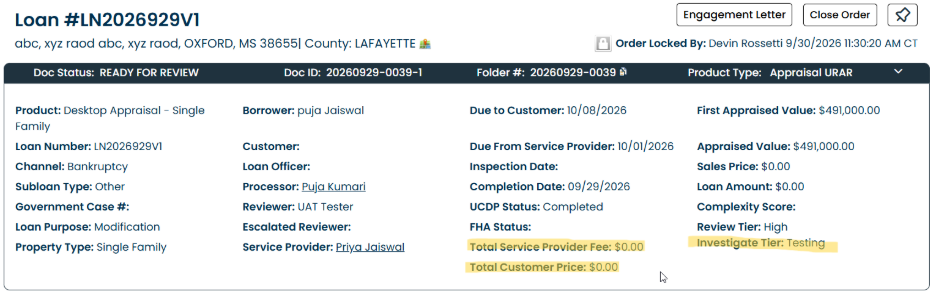
Note: Next Wednesday, we will release an update to production enabling the system to send Collateral Investigate tier data to connected loan origination systems (LOS).
GSE Risk Decision status mapping [APPMOD-12099]:
The platform now applies UAD 3.6 workflow prioritization in the Decision management admin configuration to GSE Risk Classifications, ensuring order statuses update properly when decision-driven status settings are enabled.
Engagement Letter instruction display [APPMOD-12132]:
We fixed an issue where Engagement Letters were not displaying all relevant instruction sets. Engagement letters now display all configured instructions in the correct sequence, ensuring appraisers see the complete set of required instructions.
Final delivery RealEC ROV event recognizes UAD 3.6 appraisals [APPMOD-12136]:
The final delivery ROV event (Event 537) now classifies MISMO 3.6 reports as appraisals for clients who use this setting.
Improved Collateral Investigate message routing [APPMOD-12137]:
We fixed an issue where the system was not always accurately mapping incoming Collateral Investigate message flags to the correct recipients. Messages from Collateral Investigate now show as new or read for the right audience, whether that's the service provider, customer, processor, or integrated LOS.
Security improvements
We are continuing regular maintenance activities to support system security, protect user data, and ensure reliable performance.
Issue resolutions
Investor submission on revised appraisals [APPMOD-11916]:
We fixed an issue where revisions on completed UCDP submissions were not always moving forward as expected.
Child order appraiser assignment [APPMOD-12010]:
We fixed an issue where some child orders created from existing parent orders were sent to RFP when they should not have been. Child orders now automatically inherit the assigned appraiser instead of routing to an unassigned RFP queue.
Order Creation to Collateral Investigate for Unassigned Channels [APPMOD-12100]:
Orders without a populated channel value can now successfully initiate and generate review requests in Collateral Investigate without encountering system errors.
Engagement Letter File Type Mapping [APPMOD-12103, APPMOD-12104]:
The system now standardizes Engagement Letter document type mappings across CMS and Ports, ensuring uploaded engagement letters persist and categorize correctly across all interfaces.
AppraisalPort updates
File retrieval through AppraisalPort Integration[APPMOD-11922, APPMOD-12101, APPMOD-12131]:
Integrated partners can now download order files, including Revision Request PDFs, through the AppraisalPort integration without being sent to a login page.
Coming soon
Please visit our Valuation Modernization resource hub designed exclusively for our existing clients. This dedicated site offers comprehensive documentation on the upcoming platform updates to support UAD 3.6 appraisal workflow. We will keep the site regularly updated with new resources to help you navigate the changes smoothly, so check back often.
Please subscribe to receive notifications when new product news and release notes are posted. Thank you for your continued feedback and partnership in improving our platforms.
For any questions or concerns, please reach out to your Client Success Manager. You can also contact Cotality Support.
CMS Support
Monday - Friday 7 a.m.- 7 p.m. CST
888-963-3330
fncsupport@cotality.com